 English
  Nederlands
  Español
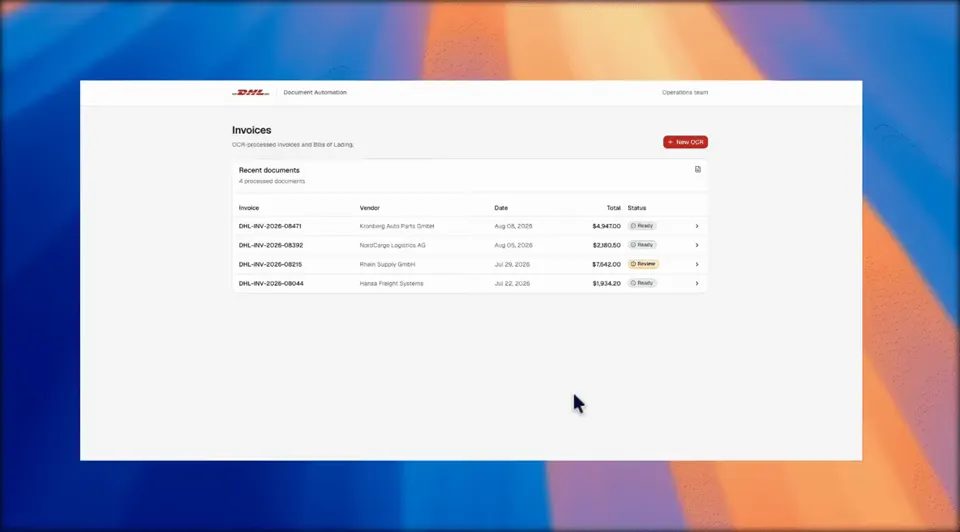
A bill of lading carries twenty fields. A commercial invoice carries the ones customs cares about. Somebody reads both and types them into a system that should have received them directly. Document extraction removes that step without giving up the human judgement that exceptions still need.
Ingest, extract, post
- 01
Ingest
Documents arrive the way they already do — email attachments, a scanner, a shared folder, an upload from a customer portal, or a photo taken at the counter.
No one has to change how documents reach you.
- 02
Extract
AI-powered OCR reads each document type and returns the fields your process needs, with a confidence score per field.
Layouts that change do not break the flow, because the model reads content rather than fixed coordinates.
- 03
Post
Extracted values are validated against your rules — known customers, valid article numbers, quantities that add up — and posted into your TMS, ERP, invoicing or customs declaration, with the original document attached for the audit trail.
What you get
- Bills of lading, commercial invoices, packing lists, delivery notes and CMR documents
- Per-field confidence scores, so low-confidence values go to a human instead of the database
- Validation against your master data before anything is posted
- Structured output for TMS, ERP and customs declarations, including EUCDM XML
Which documents, and which fields
We start from the documents that consume the most time per shipment, not from the most impressive demo. In freight forwarding and customs work that is usually the bill of lading, the commercial invoice and the packing list, with delivery notes and CMRs close behind.
The field list is yours: we extract what your downstream process actually consumes, so the output can be posted without a human reformatting it.
Fields we typically return
- Shipment identifiers: B/L number, booking, container and seal numbers
- Parties: shipper, consignee, notify party, carrier, with addresses as separate fields
- Goods: descriptions, article numbers, quantities, units, weights, package counts
- Commercials: invoice number and date, currency, values, Incoterms, country of origin
Accuracy, exceptions and the human in the loop
Extraction is never treated as all-or-nothing. Every field comes back with a confidence score; values below your threshold are queued for review with the source document next to them, so a person corrects one field instead of typing twenty.
That review queue is also where the model improves: corrections are captured, so recurring supplier layouts stop generating exceptions over time.
- Configurable confidence thresholds per document type and per field
- Review queue with side-by-side document and extracted values
- Corrections fed back so recurring exceptions disappear
- Full audit trail: original document, extracted values, who approved what
From document to customs declaration
For customs work, extraction is only half the job. The values also have to land in a declaration that a customs authority accepts, in the structure that authority expects.
We build the mapping from extracted fields to declaration data, including EUCDM XML, so a document that arrives in the morning can be declared the same day without a re-keying step in between.
- Mapping from extracted fields to your declaration structure
- EUCDM XML output for customs procedures
- HS code and country-of-origin fields carried through instead of retyped
- Integration with the systems you already declare from
Frequently asked questions
How accurate is the extraction in practice?
On the DHL Aruba document flow we run at 96%+ extraction accuracy with roughly four minutes of processing time per document. Accuracy depends on document quality, so we measure it on your own samples before committing to a number.
What happens when a supplier changes their document layout?
Nothing breaks. The models read document content rather than fixed coordinates, so a new layout is handled like any other document. If a field stops being found reliably, it surfaces in the review queue and we adjust the field definition.
Do we need to send documents somewhere else?
No. Processing runs inside the flow you already have — documents arrive by email, scanner, shared folder or upload, and the structured result is posted back into your own systems. We do not need custody of your documents.
Can it output to our customs declaration system?
Yes, including EUCDM XML where that is what the declaration requires. We build the mapping from extracted fields to the declaration structure you file from.
Can we start with one document type?
That is the recommended start. One document type, one downstream system, measured accuracy — then we extend to the next document once the first flow is proven in production.
The other data capabilities
Capture, extraction and communication are one pipeline. Most operations start where the pain is highest and extend from there.
Send us the document that costs you the most time.
A bill of lading, an invoice, a packing list — anything that someone currently types in by hand. We will run it through the extraction flow and show you the fields that come back, with the confidence scores attached.
Related work
Case studies